Transport Fever 3 Ship Not Loading Oil: Check the Ship-to-Road Handoff
If your Transport Fever 3 ship will not load oil, check the ship’s crude-oil compatibility and the loading selection at its actual pickup stop first. If oil reaches the port but the next vehicle stays empty, trace the warehouse module and the road pickup separately. A liquid storage building beside the port does not, by itself, establish that the whole transfer is configured.
Download the oil handoff checklist
Checked October 19, 2026. This is a review of documented controls and player-reported conditions, not our own gameplay test. One reported storage case has a player-confirmed outcome; the separate oil-pickup case remains unresolved. Neither is a guaranteed fix for your save.
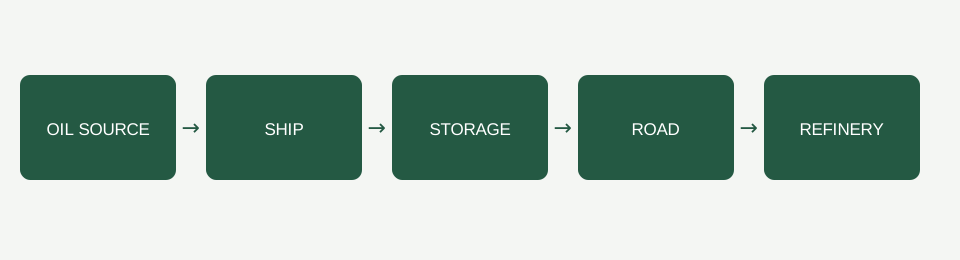
The ship stays empty at the oil source
Open the ship’s vehicle information or the vehicle store and check the cargo specialization for that exact model. The store’s cargo bar can filter vehicles by the cargo they can carry. A general description such as “small cargo ship” does not settle crude-oil compatibility.
Next, select the ship line in the line manager. Open the pickup stop’s configuration or its cargo icons in the bottom area. Check that crude oil is selected for loading and inspect the assigned load percentage. These choices belong to each stop. Enabling oil at another stop, or on the road line, does not configure this ship pickup.
Keep an observation of the source stock and the ship’s cargo before and after the visit. An empty ship and an incompatible-cargo warning are different observations; copy the exact warning instead of replacing it with a diagnosis. Do not add a second oil pickup merely because another working route visits two sources. That would change the route before you know which handoff failed.
Oil reaches the port, but the road vehicle stays empty
- Look for the oil in storage. Select the warehouse and open Stocks. Inspect the module row, its supported cargo and the amount actually stored. The fact that a ship visited the port is not a substitute for finding crude oil in the module.
- Check access from both sides. The warehouse must be inside the relevant station’s catchment radius for cargo transfer. Check the harbor side and the road-station side individually. A warehouse does not require road access, so adding a road alone does not establish that a missing handoff is repaired.
- Check the road vehicle, then its pickup stop. Confirm crude-oil compatibility for the actual road vehicle. In the road line’s pickup-stop configuration, check the crude-oil loading selection and percentage. Retain a separate row for this stop; the ship’s settings are not inherited by the road service.
- Follow the onward delivery. Keep the intended refinery and its stop in the record. Factories do not take cargo directly from warehouse contents. A transfer store is an intermediate handoff, so oil sitting there does not prove the refinery leg works.
At each handoff, compare the cargo amount on the arriving vehicle with the module or departing vehicle. Use your own observations, not a guessed waiting time. If you cannot see where the cargo went, leave the outcome unresolved and retain the warning and module selection before changing anything else.
Crude oil takes the space intended for fuel
A Liquid specialization and a selected cargo type are separate settings. A specialized module stores one cargo type at a time. Crude oil and fuel therefore need separate specialized modules even though they share the Liquid category. In Stocks, use the specialized module’s cargo icons to choose which cargo it should hold.
This distinction matters on a return chain: a ship delivers crude oil to the port, road vehicles take it to a refinery, and fuel returns to the port for another ship journey. Label the crude-oil module and the fuel module in your record, then inspect their actual selections. Do not assume the empty second module has already been reserved for fuel.
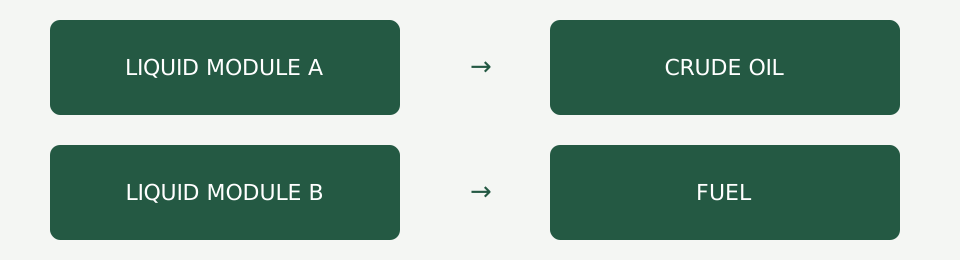
There is a reported case with exactly this mixed-storage symptom: crude oil occupied the space intended for fuel. After the cargo assignment was explicitly set, the player confirmed the problem was solved. That supports a specific check for that symptom. It does not establish that selecting cargo will solve every empty ship.
Dated condition and outcome comparison
Conditions reviewed October 19, 2026. The date marks this review, not a personal test session or the publication date of a reported case.
On a phone, swipe the table sideways. The same checks are available in the downloadable sheet.
| Condition | What was established | What was not established | Next useful record |
|---|---|---|---|
| Small ship, oil source, universal station and onward road leg | The player reported a cargo-type problem on the ship and road stages. | The exact failed setting and final resolution were not confirmed. | Keep ship and road symptoms in separate rows. |
| Oil selected and liquid storage already added | The same player said both changes had already been made. | Those changes did not establish a successful delivery in that case. | Record the actual pickup stop and module contents, not only the actions attempted. |
| Crude oil and returning fuel share a port | A different player reported crude oil taking storage intended for fuel, then confirmed a solution after assigning cargo explicitly. | This was a player-confirmed outcome, not an independently reproduced result. | Keep each module’s cargo selection beside its actual stock. |
| Station loading filters | Cargo loading choices are configured per stop. | A correct setting on one line does not establish the setting on another line. | Record ship pickup and road pickup independently. |
| Storage specialization | A specialized module holds one cargo type at a time; crude oil and fuel require separate modules. | A loading-speed penalty does not by itself explain a refusal to load. | Separate cargo acceptance from handling speed. |
| Platform, build and mods | The worksheet leaves these conditions for the reader to record. | Console control parity and mod-specific behavior were not tested here. | Copy the exact conditions before presenting a workaround as reproduced. |
Use the worksheet without turning guesses into results
The oil handoff CSV has separate rows for the source-to-ship, ship-to-storage, storage-to-road and refinery handoffs. Optional return-fuel rows cover the mixed-storage case. Gameplay measurements and outcomes are blank for you to fill; the printed review date is not a result from your save.
Start at the first stage with visible evidence of failure. Record the warning, vehicle, stop and module before making a change. Change one selection, then revisit the same handoff and record the outcome. If the ship starts loading but road pickup still fails, keep both results: the first handoff improved, while the complete chain is still unresolved.
Do not discard stock or demolish the warehouse as a default diagnostic step. Preserve the current conditions first. A successful cargo assignment in one reported case is useful precisely because its starting condition and outcome are kept together; removing the conditions turns it into an unreliable blanket fix.
Does specialized liquid storage automatically make oil load?
No. The module must accept the intended cargo, the vehicle must be compatible, and the relevant pickup must be configured. The warehouse also needs transfer access from the relevant station. Check those separately; ownership of a liquid module proves none of the other selections.
If cargo is moving but the stop is slow, use the platform loading review for handling and waiting. If the line cannot reach its stop, use connection troubleshooting. This page ends with an observed cargo handoff, not a claim about route profit.
To place this specific question in the broader game assessment, compare it with the Transport Fever 3 review while keeping the conditions on this page separate.